担保と借入の画面を作る
作るもの
このレッスンを終えると、ブラウザでヘッダーのタブを押して借り手と貸し手のページを切り替えられます。
貸し手のページでは、銀行が借り手へ貸す円を入れ、評価会社が社債1口の価格を入れられます。
借り手のページでは、借り手が社債を担保に預け、掛け目80%の枠まで円を1回だけ借りられます。
ローカルノードでは画面の右上でanvilのアカウントを選ぶだけで、借り手と銀行と評価会社の3つの役を1つのブラウザで試せます。
背景
銀行や証券会社の担保ローンでは、借り手は預けた証券の評価額と借りられる枠を、金融機関の画面や取引の報告で確かめます。
その数字は、金融機関が持つ帳簿と評価の担当が入れた時価から作られます。
借り手と貸し手が別々の帳簿を見ると、評価額や枠の数字が食い違うことがあります。
このコースの画面は、金融機関のサーバーを通さず、チェーンの上のローンと価格のコントラクトから直接読みます。
貸し手も借り手も同じコントラクトを読むため、担保の評価額と借入枠の数字が食い違いません。
画面はページを分けるだけで、誰が何をできるかはコントラクトの役割が決めます。
| ページ | パス | 使う人 | できること |
|---|---|---|---|
| 借り手 | / |
借り手A・B・C | 社債を担保に預け、借入枠の中で1回だけ円を借りる |
| 貸し手 | /lender |
銀行と評価会社 | 銀行が円を入れ、評価会社が社債1口の価格を入れる。 借り手ごとの担保と借入を見る |
円トークンと社債トークンを動かす操作は、どれも先にapproveでローンに任せてから呼びます。
ローンは任された分だけをtransferFromで受け取るため、借り手が決めた口数より多くの社債を持っていかれることはありません。
実装
雛形のstarter/app/src/には、次のファイルが最初から入っています。
このレッスンでは、これらを土台に、ローンを読むフックと取引を送るフックと2つのページを足します。
| ファイル | 役割 |
|---|---|
lib/chains.ts |
ローカルノードのanvilとFujiのチェーンの定義と、local.jsonのアカウントの名前と役 |
lib/wagmi.ts |
wagmiの設定。 ローカルノードは mock、Fujiはブラウザのウォレットでつなぐ |
lib/deployments.ts |
Ignitionの記録から、円トークンと社債と決済と価格とローンのアドレスを読む |
lib/format.ts |
円と口数と日付と割合の表示を作る。 コントラクトが拒んだ理由も日本語の文にする |
lib/theme.ts |
画面の色味の名前と、選んだ色味をブラウザに残す時の鍵 |
components/session.tsx |
今のネットワークと操作しているアカウントと、デプロイしたコントラクトのアドレスを持つ |
components/header.tsx |
右上に、色味を切り替えるボタンと操作するアカウントを選ぶ欄を持つ |
components/ui.tsx |
カードと入力欄と数を表示し、状態のバッジと通知の行も出すコンポーネント |
components/not-deployed.tsx |
ローンをまだデプロイしていない時に、デプロイのコマンドを示す |
ローカルノードでは、wagmiのmockコネクタが署名の依頼をそのままanvilへ渡します。
anvilが最初から持つアカウントの鍵で署名するため、鍵を画面やブラウザに置かずに済みます。
ローンを読むフック
まず、ローンと価格を読むstarter/app/src/components/use-loan.tsを作ります。
読む値に名前を付けてまとめて読み、名前ごとの値にして返します。
"use client";

import { bondTokenAbi, collateralPriceAbi, jpyTokenAbi, securitiesLoanAbi } from "@contracts/generated/abi";
import type { Abi } from "viem";
import { zeroAddress } from "viem";
import { useBlock, useReadContracts } from "wagmi";

import { useSession } from "./session";

type Read = { address: `0x${string}` | undefined; abi: Abi; functionName: string; args?: readonly unknown[] };

// 名前を付けた読み取りをまとめて読み、名前ごとの値にする。4秒ごとに読み直す
function useNamedReads(reads: Record<string, Read>, enabled: boolean) {
  const { chainId } = useSession();
  const names = Object.keys(reads);
  const result = useReadContracts({
    allowFailure: true,
    contracts: names.map((name) => ({ ...reads[name], chainId })),
    query: { enabled, refetchInterval: 4_000 },
  });
  const values: Record<string, unknown> = {};
  names.forEach((name, index) => {
    values[name] = result.data?.[index]?.result;
  });
  return values;
}| コード | 意味 |
|---|---|
useReadContracts |
複数の読み取り用の関数をまとめて呼び、結果を呼んだ順の配列で返す |
Readのabi: Abi |
ローンと価格と2つのトークンの読み取りを1つの配列に並べるため、ABIの型を広げておく。 値の型は使う所で決める |
names.forEach(...) |
配列の順の結果を、priceのような名前で引けるようにする。後の節で読む値を足しても、順番を数え直さずに済む |
refetchInterval: 4_000 |
4秒ごとに読み直す。 別のアカウントの操作も、待てば画面に出る |
同じファイルの続きに、借り手1人の担保と借入の型を書きます。
// 借り手1人の担保と借入。額は全て1円単位の整数
export type LoanPosition = {
  address: `0x${string}`;
  units: bigint;
  principal: bigint;
  borrowed: boolean;
  // 担保の評価額。価格を読めない間は undefined
  value: bigint | undefined;
};

type RawPosition = {
  units: bigint;
  principal: bigint;
  borrowed: boolean;
};| コード | 意味 |
|---|---|
LoanPosition |
画面が使う借り手1人の形。 預けた口数と元本と借りたかに、担保の評価額を足す |
RawPosition |
ローンのpositionOfが返す構造体の形。後の節でコントラクトの Positionに値を足すと、ここにも足す |
続けて、ローンと価格の状態と借り手ごとの担保と借入を読むuseLoanを書きます。
// ローンと価格の状態と、担保を預けた借り手ごとの担保と借入と、今のアカウントの残高を読む
export function useLoan() {
  const { contracts, address } = useSession();
  const me = address ?? zeroAddress;
  const loan = { address: contracts.loan, abi: securitiesLoanAbi as Abi };
  const price = { address: contracts.price, abi: collateralPriceAbi as Abi };
  const bond = { address: contracts.bond, abi: bondTokenAbi as Abi };
  const jpy = { address: contracts.jpy, abi: jpyTokenAbi as Abi };
  const enabled = Boolean(contracts.loan);
  const block = useBlock({ watch: true, query: { enabled } });

  const base = useNamedReads(
    {
      price: { ...price, functionName: "price" },
      updatedAt: { ...price, functionName: "updatedAt" },
      lender: { ...loan, functionName: "lender" },
      rateBps: { ...loan, functionName: "rateBps" },
      ltvBps: { ...loan, functionName: "LTV_BPS" },
      dueDate: { ...loan, functionName: "dueDate" },
      funded: { ...loan, functionName: "funded" },
      lent: { ...loan, functionName: "lent" },
      cash: { ...loan, functionName: "cash" },
      borrowers: { ...loan, functionName: "borrowers" },
      units: { ...bond, functionName: "balanceOf", args: [me] },
      yen: { ...jpy, functionName: "balanceOf", args: [me] },
      allowed: { ...jpy, functionName: "isAllowed", args: [me] },
    },
    enabled,
  );

  // 担保を預けた借り手と今のアカウントの、担保と借入を読む
  const listed = (base.borrowers as `0x${string}`[] | undefined) ?? [];
  const accounts = address && !listed.some((entry) => entry.toLowerCase() === address.toLowerCase()) ? [...listed, address] : listed;
  const per = useNamedReads(
    Object.fromEntries(
      accounts.flatMap((account) => [
        [`position:${account}`, { ...loan, functionName: "positionOf", args: [account] }],
      ]),
    ),
    enabled && accounts.length > 0,
  );

  const priceNow = base.price as bigint | undefined;
  const positionOf = (account: `0x${string}`): LoanPosition => {
    const raw = per[`position:${account}`] as RawPosition | undefined;
    const units = raw?.units ?? 0n;
    const principal = raw?.principal ?? 0n;
    return {
      address: account,
      units,
      principal,
      borrowed: raw?.borrowed ?? false,
      value: priceNow === undefined ? undefined : units * priceNow,
    };
  };

  const now = block.data?.timestamp;
  const updatedAt = base.updatedAt as bigint | undefined;
  return {
    now,
    price: priceNow,
    updatedAt,
    lender: base.lender as `0x${string}` | undefined,
    rateBps: base.rateBps as bigint | undefined,
    ltvBps: (base.ltvBps as bigint | undefined) ?? 8_000n,
    dueDate: base.dueDate as bigint | undefined,
    funded: base.funded as bigint | undefined,
    lent: base.lent as bigint | undefined,
    cash: base.cash as bigint | undefined,
    units: base.units as bigint | undefined,
    yen: base.yen as bigint | undefined,
    allowed: base.allowed as boolean | undefined,
    mine: address ? positionOf(address) : undefined,
    positions: listed.map(positionOf),
  };
}

export type LoanState = ReturnType<typeof useLoan>;| コード | 意味 |
|---|---|
contracts.loanとcontracts.price |
session.tsxが持つ、Ignitionの記録から読んだローンと価格のコントラクトのアドレス |
address ?? zeroAddress |
アカウントが決まる前はゼロアドレスで読む。 読み取りの数を変えずに済む |
useBlock({ watch: true, ... }) |
新しいブロックを見張り、チェーンの今の時刻をnowとして返す。次の節で利息の日数を数えるのに使う |
priceとupdatedAt |
評価会社が入れた社債1口の価格と、入れた時刻 |
ltvBps |
掛け目のLTV_BPS。1万分の8000で80%になる。 読めるまでは同じ 8_000nを使う |
fundedとlentとcash |
銀行が入れた円、貸した元本の和、今貸せる残り。 どれも1円単位の整数 |
borrowers |
担保を預けたことのある借り手の一覧。 貸し手のページの表に並べる |
accounts |
一覧の借り手に、今のアカウントを足した並び。 まだ預けていない借り手も自分の担保と借入を読める |
value: ... units * priceNow |
預けた口数に1口の価格を掛けた担保の評価額。 コントラクトの collateralValueと同じ計算 |
mineとpositions |
今のアカウントの担保と借入と、一覧の借り手ごとの担保と借入 |
取引を送るフック
次に、取引を送るstarter/app/src/components/use-send.tsを作ります。
どのページもこのフックで取引を送ります。
"use client";

import { bondSettlementAbi, bondTokenAbi, collateralPriceAbi, jpyTokenAbi } from "@contracts/generated/abi";
import { useQueryClient } from "@tanstack/react-query";
import { useState } from "react";
import type { Abi } from "viem";
import { useConfig } from "wagmi";
import { simulateContract, waitForTransactionReceipt, writeContract } from "wagmi/actions";

import { explainError } from "@/lib/format";

import { useSession } from "./session";
import type { Notice } from "./ui";

// 1つの取引の中身。担保を預けるように社債を任せてから預ける操作は、2つの取引を順に送る
export type Call = {
  abi: Abi;
  address: `0x${string}` | undefined;
  functionName: string;
  args: readonly unknown[];
};

// ローンのコントラクトの中で円トークンや社債や価格や決済が断った時も理由を読めるよう、それぞれのエラーの定義を足して試す
const innerErrors = [...jpyTokenAbi, ...bondTokenAbi, ...collateralPriceAbi, ...bondSettlementAbi].filter((item) => item.type === "error") as Abi;

// 送る前に同じ取引を試し、コントラクトが拒む時は送らずに理由を出す。
// 通る時だけ送り、ブロックに入るまで待ってから、画面の読み取りを全て読み直す
export function useSend() {
  const config = useConfig();
  const queryClient = useQueryClient();
  const { chainId, address } = useSession();
  const [pending, setPending] = useState<string>();
  const [notice, setNotice] = useState<Notice>();

  async function send(key: string, done: string, calls: Call[]) {
    if (!address || calls.some((call) => !call.address)) return false;
    setPending(key);
    setNotice(undefined);
    try {
      for (const call of calls) {
        const { request } = await simulateContract(config, { ...call, abi: [...call.abi, ...innerErrors], account: address, chainId } as Parameters<typeof simulateContract>[1]);
        const hash = await writeContract(config, request);
        const receipt = await waitForTransactionReceipt(config, { hash, chainId });
        if (receipt.status !== "success") throw new Error("reverted");
      }
      setNotice({ kind: "ok", text: done });
      await queryClient.invalidateQueries();
      return true;
    } catch (error) {
      setNotice({ kind: "error", text: explainError(error) });
      return false;
    } finally {
      setPending(undefined);
    }
  }

  return { send, pending, notice };
}| コード | 意味 |
|---|---|
Call |
送る取引の中身。 送り先のアドレスと関数の名前と引数を持つ |
send(key, done, calls) |
callsを書いた順に1つずつ送る。社債を任せてから預けるような、2つの取引が要る操作もまとめて頼める |
innerErrors |
円トークンと社債と価格と決済のエラーの定義。 ローンの中で円トークンが拒んだ時も、エラーの名前を読める |
simulateContract(...) |
取引を送らずに試す。 拒まれる時はここでエラーになり、取引は送られない |
writeContractとwaitForTransactionReceipt |
試して通った取引を送り、ブロックに入るまで待つ |
queryClient.invalidateQueries() |
画面の読み取りを全てやり直し、送った結果を出す |
explainError(error) |
拒んだ理由をlib/format.tsの文に変える。枠を超えた時は「借入枠を超えています。 担保を足すか、額を減らしてください」になる |
試さずに送ると、anvilは拒まれる取引もブロックに入れます。
結果は「失敗した」だけになり、拒んだ理由を画面に出せません。
借り手のページ
借り手のページの中身を、starter/app/src/components/borrower-view.tsxに作ります。
まず、読み込みと、入力欄の値と借入枠を書きます。
"use client";

import { bondTokenAbi, securitiesLoanAbi } from "@contracts/generated/abi";
import { useState } from "react";
import type { Abi } from "viem";

import { formatDate, formatUnitsCount, formatWholeYen, parseCount, shortAddress } from "@/lib/format";

import { NotDeployed } from "./not-deployed";
import { useSession } from "./session";
import { Amount, Card, Field, NoticeLine } from "./ui";
import { useLoan } from "./use-loan";
import { useSend } from "./use-send";

export function BorrowerView() {
  const session = useSession();
  const loanState = useLoan();
  const { send, pending, notice } = useSend();
  const { contracts } = session;
  const me = session.address;
  const loan = { abi: securitiesLoanAbi as Abi, address: contracts.loan };
  const bond = { abi: bondTokenAbi as Abi, address: contracts.bond };
  const position = loanState.mine;
  const price = loanState.price ?? 0n;
  const [pledgeUnits, setPledgeUnits] = useState("");
  const [borrowAmount, setBorrowAmount] = useState("");
  const pledgeCount = parseCount(pledgeUnits);
  const borrowValue = parseCount(borrowAmount);
  const limit = position ? (position.units * price * loanState.ltvBps) / 10_000n : undefined;

  if (!contracts.loan) return <NotDeployed />;
if (!me || !position) return null;| コード | 意味 |
|---|---|
loanとbond |
送り先のアドレスとABIの組。sendに渡すCallの土台にする |
position = loanState.mine |
今のアカウントの担保と借入。 まだ預けていない時も口数0の形で返る |
parseCount(...) |
入力欄の字を1以上の整数に読む。 0と小数と空の時は undefinedを返し、ボタンを押せなくする |
limit |
借入枠。 預けた口数と価格と掛け目を掛け、1万で割る。 コントラクトの borrowLimitと同じ計算 |
if (!contracts.loan) return <NotDeployed />; |
ローンをまだデプロイしていない時は、デプロイのコマンドを示す |
続けて、借りている元本と担保を大きく出す上の段を書きます。
  return (
    <div className="stack">
      <div className="hero">
        <div>
          <p className="hero-label">借りている元本</p>
          <p className="hero-value">
            <Amount text={formatWholeYen(position.principal)} />
          </p>
          <p className="hero-sub">
            {session.label ?? "このアカウント"} {shortAddress(me)}
          </p>
        </div>
        <ul className="status-list" aria-label="担保と借入の状態">
          <li>
            <span>担保の社債</span>
            <span className="mono">{formatUnitsCount(position.units)}</span>
          </li>
          <li>
            <span>担保の評価額</span>
            <span className="mono">{formatWholeYen(position.value)}</span>
          </li>
        </ul>
</div>| コード | 意味 |
|---|---|
formatWholeYen(position.principal) |
ローンは額を1円単位の整数で持つので、18桁の単位に直さずに700,000円の形にする |
formatUnitsCount(position.units) |
預けた口数を10口の形にする |
formatWholeYen(position.value) |
担保の評価額。 価格を読めない間は -を出す |
次に、担保を預ける欄を書きます。
      <div className="grid-2">
        <Card title="担保を預ける" description="2作目の社債トークンを担保に預けます。1口の評価額は、評価会社が入れた最新の価格です。">
          <form
            className="form form-inline"
            onSubmit={async (event) => {
              event.preventDefault();
              if (pledgeCount === undefined) return;
              const ok = await send("pledge", `社債${formatUnitsCount(pledgeCount)}を担保に預けました`, [
                { ...bond, functionName: "approve", args: [contracts.loan, pledgeCount] },
                { ...loan, functionName: "pledge", args: [pledgeCount] },
              ]);
              if (ok) setPledgeUnits("");
            }}
          >
            <Field label="預ける口数" unit="口">
              <input inputMode="numeric" value={pledgeUnits} onChange={(event) => setPledgeUnits(event.target.value)} placeholder="10" />
            </Field>
            <button className="button button-primary" type="submit" disabled={pledgeCount === undefined || pending !== undefined}>
              {pending === "pledge" ? "預けています" : "預ける"}
            </button>
          </form>
          <dl className="facts">
            <div>
              <dt>持っている社債</dt>
              <dd>{formatUnitsCount(loanState.units)}</dd>
            </div>
            <div>
              <dt>1口の評価額</dt>
              <dd>{formatWholeYen(loanState.price)}</dd>
            </div>
          </dl>
</Card>| コード | 意味 |
|---|---|
{ ...bond, functionName: "approve", args: [contracts.loan, pledgeCount] } |
預ける口数だけを、社債トークンのapproveでローンに任せる。社債は桁を持たないので口数をそのまま渡す |
{ ...loan, functionName: "pledge", args: [pledgeCount] } |
任せた口数をローンに預ける。 ローンが transferFromで社債を受け取る |
if (ok) setPledgeUnits("") |
2つの取引が通った時だけ入力欄を空にする。 拒まれた時は入れた字を残す |
pending === "pledge" |
送っている間はボタンの字を「預けています」にし、全てのボタンを押せなくする |
loanState.units |
まだ預けていない、手持ちの社債の口数 |
最後に、借りる欄を書いてページを閉じます。
        <Card title="借りる" description="担保の評価額に掛け目80%を掛けた額まで、1回だけ借りられます。">
          <form
            className="form form-inline"
            onSubmit={async (event) => {
              event.preventDefault();
              if (borrowValue === undefined) return;
              const ok = await send("borrow", `${formatWholeYen(borrowValue)}を借りました`, [{ ...loan, functionName: "borrow", args: [borrowValue] }]);
              if (ok) setBorrowAmount("");
            }}
          >
            <Field label="借りる額" unit="円">
              <input
                inputMode="numeric"
                value={borrowAmount}
                onChange={(event) => setBorrowAmount(event.target.value)}
                placeholder="700000"
                disabled={position.borrowed}
              />
            </Field>
            <button className="button button-primary" type="submit" disabled={position.borrowed || borrowValue === undefined || pending !== undefined}>
              {pending === "borrow" ? "借りています" : "借りる"}
            </button>
          </form>
          <dl className="facts">
            <div>
              <dt>借入枠</dt>
              <dd>{formatWholeYen(limit)}</dd>
            </div>
            <div>
              <dt>貸し手が貸せる残り</dt>
              <dd>{formatWholeYen(loanState.cash)}</dd>
            </div>
            <div>
              <dt>返済の期限</dt>
              <dd>{formatDate(loanState.dueDate)}</dd>
            </div>
          </dl>
          {position.borrowed ? <p className="muted">借りられるのは1回だけです</p> : null}
        </Card>
      </div>

      <NoticeLine notice={notice} />
    </div>
  );
}| コード | 意味 |
|---|---|
args: [borrowValue] |
借りる額を1円単位の整数で渡す。 ローンが18桁の単位に直して円トークンを送る |
disabled={position.borrowed} |
1回借りた後は、入力欄とボタンを押せなくする。 コントラクトも2回目を AlreadyBorrowedで拒む |
formatWholeYen(limit) |
借入枠を出す。 枠を超える額を入れると、送る前の試しで「借入枠を超えています」と出る |
loanState.cash |
銀行が入れた円のうち、まだ貸していない額。 これを超えて借りようとすると OverLenderCashで拒まれる |
formatDate(loanState.dueDate) |
返済の期限を2026-12-15の形にする |
<NoticeLine notice={notice} /> |
送った結果か拒んだ理由を、ページの下に1行で出す |
借入枠の数字は画面でも計算しますが、借りられるかを決めるのはローンのコントラクトです。
画面の計算が古い価格のままでも、コントラクトがborrowの時に最新の価格で枠を計算し直します。
貸し手のページ
貸し手のページには、評価会社が入れる価格の欄も置きます。
価格は0円も入れられるよう、starter/app/src/lib/format.tsのparseCountの後に、0を受け付ける読み方を足します。
// 価格の入力欄は0も受け付ける。不履行の社債の価格は0にする
export function parseAmount(input: string): bigint | undefined {
  const text = input.replaceAll(",", "").trim();
  if (!/^(0|[1-9][0-9]*)$/.test(text)) return undefined;
  return BigInt(text);
}| コード | 意味 |
|---|---|
| `/^(0 | [1-9][0-9]*)$/` |
不履行の社債の価格は0にする |
発行体が利金を払えなくなった社債は、最後の節で評価会社が価格を0円にする |
貸し手のページの中身を、starter/app/src/components/lender-view.tsxに作ります。
まず、読み込みと入力欄の値と、貸している元本の和を書きます。
"use client";

import { collateralPriceAbi, jpyTokenAbi, securitiesLoanAbi } from "@contracts/generated/abi";
import { useState } from "react";
import type { Abi } from "viem";

import { labelOf } from "@/lib/chains";
import { formatDate, formatPercent, formatUnitsCount, formatWholeYen, formatYen, parseAmount, parseCount, shortAddress, YEN } from "@/lib/format";

import { NotDeployed } from "./not-deployed";
import { useSession } from "./session";
import { Amount, Card, Field, NoticeLine } from "./ui";
import { useLoan } from "./use-loan";
import { useSend } from "./use-send";

export function LenderView() {
  const { contracts } = useSession();
  const loanState = useLoan();
  const { send, pending, notice } = useSend();
  const loan = { abi: securitiesLoanAbi as Abi, address: contracts.loan };
  const price = { abi: collateralPriceAbi as Abi, address: contracts.price };
  const jpy = { abi: jpyTokenAbi as Abi, address: contracts.jpy };
  const [fundAmount, setFundAmount] = useState("");
  const [priceInput, setPriceInput] = useState("");
  const fundValue = parseCount(fundAmount);
  const priceValue = parseAmount(priceInput);
  const lent = loanState.positions.reduce((sum, position) => sum + position.principal, 0n);

if (!contracts.loan) return <NotDeployed />;| コード | 意味 |
|---|---|
labelOf |
アドレスからlocal.jsonの名前 (「銀行」や「借り手A」) を引く |
parseAmount(priceInput) |
価格の入力欄だけは0も受け付ける |
lent |
借り手ごとの元本を足した、今貸している元本の和 |
上の段には、貸している元本と、ローンの条件を出します。
  return (
    <div className="stack">
      <div className="hero">
        <div>
          <p className="hero-label">貸している元本</p>
          <p className="hero-value">
            <Amount text={formatWholeYen(lent)} />
          </p>
          <p className="hero-sub">
            {labelOf(loanState.lender) ?? "貸し手"} {loanState.lender ? shortAddress(loanState.lender) : null}
          </p>
        </div>
        <ul className="status-list" aria-label="貸し手の状態">
          <li>
            <span>入れた円</span>
            <span className="mono">{formatWholeYen(loanState.funded)}</span>
          </li>
          <li>
            <span>貸せる残り</span>
            <span className="mono">{formatWholeYen(loanState.cash)}</span>
          </li>
          <li>
            <span>年の金利</span>
            <span className="mono">{formatPercent(loanState.rateBps)}</span>
          </li>
          <li>
            <span>返済の期限</span>
            <span className="mono">{formatDate(loanState.dueDate)}</span>
          </li>
        </ul>
</div>| コード | 意味 |
|---|---|
labelOf(loanState.lender) |
ローンが持つ貸し手のアドレスから名前を引く。 ローカルノードでは「銀行」になる |
formatPercent(loanState.rateBps) |
1万分の1の単位の200を、2.00%の形にする |
次に、円を入れる欄と担保の価格の欄を並べます。
      <div className="grid-2">
        <Card title="円を入れる" description="借り手へ貸す円を、ローンのコントラクトへ入れます。入れられるのは貸し手の銀行のアカウントだけです。">
          <form
            className="form form-inline"
            onSubmit={async (event) => {
              event.preventDefault();
              if (fundValue === undefined) return;
              const ok = await send("fund", `${formatWholeYen(fundValue)}を入れました`, [
                { ...jpy, functionName: "approve", args: [contracts.loan, fundValue * YEN] },
                { ...loan, functionName: "fund", args: [fundValue] },
              ]);
              if (ok) setFundAmount("");
            }}
          >
            <Field label="入れる額" unit="円">
              <input inputMode="numeric" value={fundAmount} onChange={(event) => setFundAmount(event.target.value)} placeholder="1000000" />
            </Field>
            <button className="button button-primary" type="submit" disabled={fundValue === undefined || pending !== undefined}>
              {pending === "fund" ? "入れています" : "入れる"}
            </button>
          </form>
          <dl className="facts">
            <div>
              <dt>このアカウントの円</dt>
              <dd>{formatYen(loanState.yen)}</dd>
            </div>
            <div>
              <dt>貸した額の合計</dt>
              <dd>{formatWholeYen(loanState.lent)}</dd>
            </div>
          </dl>
        </Card>

        <Card title="担保の価格" description="評価会社が社債1口の価格を入れます。入れられるのは評価会社のアカウントだけで、不履行の社債は0円にします。">
          <form
            className="form form-inline"
            onSubmit={async (event) => {
              event.preventDefault();
              if (priceValue === undefined) return;
              const ok = await send("price", `社債1口の価格を${formatWholeYen(priceValue)}にしました`, [
                { ...price, functionName: "setPrice", args: [priceValue] },
              ]);
              if (ok) setPriceInput("");
            }}
          >
            <Field label="1口の価格" unit="円">
              <input inputMode="numeric" value={priceInput} onChange={(event) => setPriceInput(event.target.value)} placeholder="100000" />
            </Field>
            <button className="button button-primary" type="submit" disabled={priceValue === undefined || pending !== undefined}>
              {pending === "price" ? "入れています" : "入れる"}
            </button>
          </form>
          <dl className="facts">
            <div>
              <dt>今の価格</dt>
              <dd>{formatWholeYen(loanState.price)}</dd>
            </div>
            <div>
              <dt>入れた日</dt>
              <dd>{loanState.updatedAt ? formatDate(loanState.updatedAt) : "-"}</dd>
            </div>
          </dl>
        </Card>
</div>| コード | 意味 |
|---|---|
fundValue * YEN |
円トークンは18桁を持つので、任せる額は1円単位の額に10 ** 18を掛けて渡す |
{ ...loan, functionName: "fund", args: [fundValue] } |
ローンへ1円単位の額で入れる。 ローンが18桁の単位に直して transferFromで受け取る |
formatYen(loanState.yen) |
円トークンの18桁の単位の残高を、10,000,000円の形にする |
{ ...price, functionName: "setPrice", args: [priceValue] } |
価格のコントラクトへ社債1口の価格を入れる。VALUER_ROLEを持たないアカウントでは拒まれる |
loanState.updatedAt ? ... : "-" |
まだ価格が入っていない時はupdatedAtが0なので、日付の代わりに-を出す |
どちらの欄も、画面はどのアカウントにも押させます。
銀行でないアカウントが円を入れるとOnlyLenderで、評価会社でないアカウントが価格を入れるとAccessControlUnauthorizedAccountで、コントラクトが拒みます。
最後に、借り手ごとの担保と借入の表を書いてページを閉じます。
      <Card title="借り手" description="担保を預けた借り手ごとの、担保と借入です。">
        <div className="table-wrap">
          <table className="table">
            <thead>
              <tr>
                <th>借り手</th>
                <th className="num">担保の社債</th>
                <th className="num">担保の評価額</th>
                <th className="num">元本</th>
              </tr>
            </thead>
            <tbody>
              {loanState.positions.map((position) => (
                <tr key={position.address}>
                  <td>
                    <span className="cell-title">{labelOf(position.address) ?? "借り手"}</span>
                    <span className="cell-sub">{shortAddress(position.address)}</span>
                  </td>
                  <td className="num">{formatUnitsCount(position.units)}</td>
                  <td className="num">{formatWholeYen(position.value)}</td>
                  <td className="num">{formatWholeYen(position.principal)}</td>
                </tr>
              ))}
              {loanState.positions.length === 0 ? (
                <tr>
                  <td colSpan={4} className="muted">
                    まだ担保を預けた借り手はいません
                  </td>
                </tr>
              ) : null}
            </tbody>
          </table>
        </div>
      </Card>

      <NoticeLine notice={notice} />
    </div>
  );
}| コード | 意味 |
|---|---|
loanState.positions.map(...) |
ローンのborrowersの一覧の順に、借り手ごとの行を出す |
labelOf(position.address) ?? "借り手" |
local.jsonに名前があれば「借り手A」と出し、ない時は「借り手」と出す |
colSpan={4} |
まだ誰も預けていない時は、4つの列をまとめた1つの欄に知らせを出す |
表の列は、後の節で利息と担保維持率と状態を足していきます。
ページとタブ
starter/app/src/app/page.tsxを、借り手のページを出す形に書き換えます。
import { BorrowerView } from "@/components/borrower-view";

export default function BorrowerPage() {
  return <BorrowerView />;
}starter/app/src/app/lender/page.tsxを新しく作り、貸し手のページを/lenderに置きます。
import { LenderView } from "@/components/lender-view";

export default function LenderPage() {
  return <LenderView />;
}最後に、starter/app/src/components/header.tsxに2つのページのタブを足します。
まず、今のパスを読むusePathnameを読み込み、タブの並びを書きます。
import Link from "next/link";
import { usePathname } from "next/navigation";
import { useEffect, useState } from "react";
const pages = [
{ href: "/", label: "借り手" },
{ href: "/lender", label: "貸し手" },
];Headerの中で今のパスを読み、名前の右にタブを出します。
export function Header() {
  const pathname = usePathname();
  return (
    <header className="site-header">
      <div className="site-header-inner">
        <Link href="/" className="brand">
          <span className="brand-mark" aria-hidden="true">
            担
          </span>
          <span>HandsOn Loan</span>
        </Link>

        <nav className="tabs" aria-label="ページ">
          {pages.map((page) => (
            <Link key={page.href} href={page.href} className="tab" aria-current={pathname === page.href ? "page" : undefined}>
              {page.label}
            </Link>
          ))}
        </nav>

        <div className="header-controls">
          <ThemeControl />
          <AccountControl />
        </div>
      </div>
    </header>
  );
}| コード | 意味 |
|---|---|
usePathname() |
今開いているページのパスを読む |
aria-current={... ? "page" : undefined} |
今のページのタブにaria-current="page"を付ける。読み上げの道具にも今のページが伝わる |
<Link ...> |
Next.jsのリンク。 ページを読み直さずに切り替えるので、右上で選んだアカウントもそのまま残る |
タブの見た目は、雛形のstarter/app/src/app/globals.cssに最初から入っています。
確かめる
starter/appのディレクトリでpnpm devを実行し、ブラウザでhttp://localhost:3403を開きます。
右上のアカウントは最初「借り手A」です。
借り手のページには、借りている元本の0円と担保の社債の0口が出ます。
「担保を預ける」の欄には、持っている社債の10口と1口の評価額の100,000円が出ます。
ローンにはまだ円が入っていないので、「借りる」の欄の貸し手が貸せる残りは0円です。
ヘッダーの「貸し手」のタブを押し、右上で「銀行」を選びます。
「円を入れる」の入れる額に1000000を入れて「入れる」を押すと、「1,000,000円を入れました」と出ます。
入れた円と貸せる残りが1,000,000円になり、このアカウントの円は9,000,000円に減ります。
「借り手」のタブへ戻り、右上で「借り手A」を選びます。
「担保を預ける」の預ける口数に10を入れて「預ける」を押すと、「社債10口を担保に預けました」と出ます。
担保の評価額が1,000,000円になり、借入枠が800,000円になります。
借りる額に900000を入れて「借りる」を押すと、「借入枠を超えています。
担保を足すか、額を減らしてください」と出て、取引は送られません。
借りる額を700000に直して「借りる」を押すと、「700,000円を借りました」と出ます。
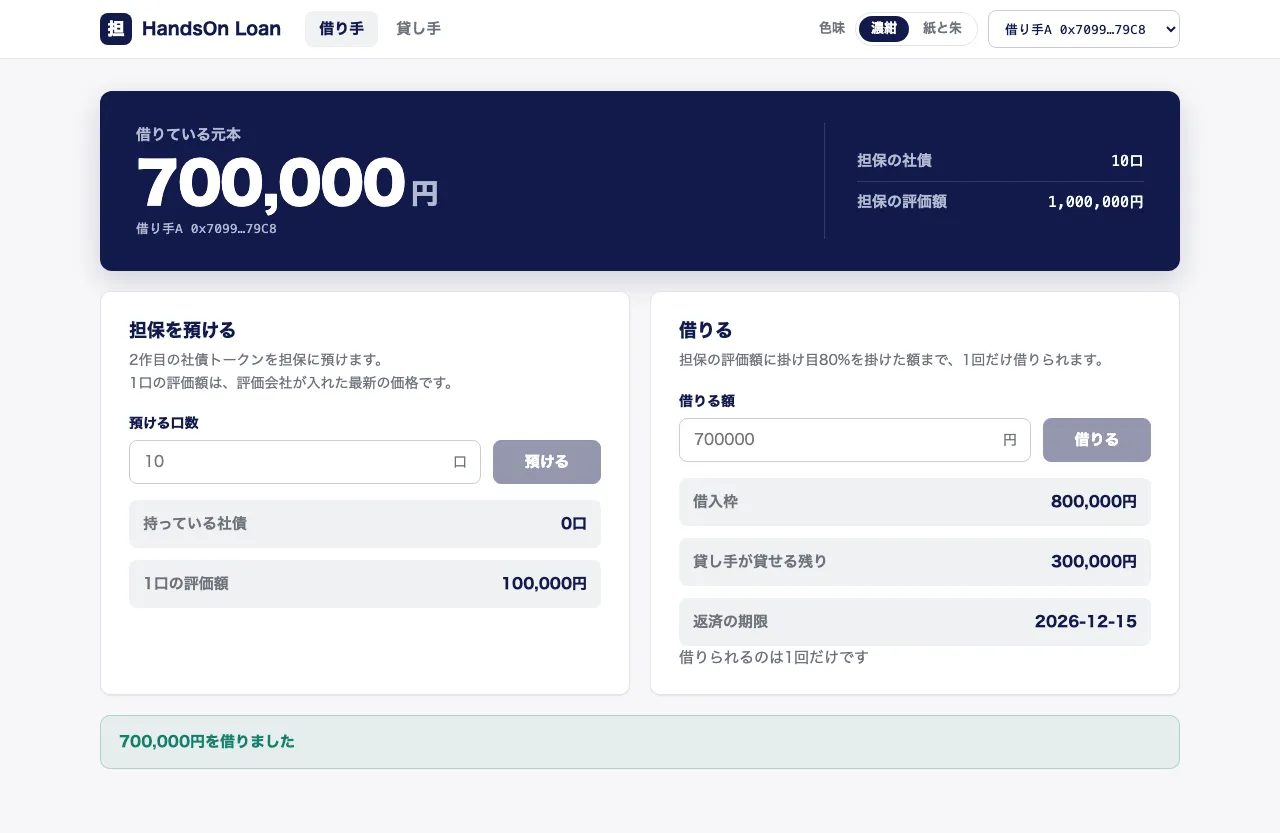
借りている元本が700,000円になり、貸し手が貸せる残りは300,000円に減ります。
借りる欄は押せなくなり、「借りられるのは1回だけです」と出ます。
「貸し手」のタブを押すと、借り手の表に借り手Aの行が出ます。
担保の社債は10口、担保の評価額は1,000,000円、元本は700,000円です。
右上で「銀行」を選んだまま「担保の価格」の1口の価格に95000を入れて「入れる」を押すと、「このアカウントは、この操作をする役割を持っていません」と出ます。
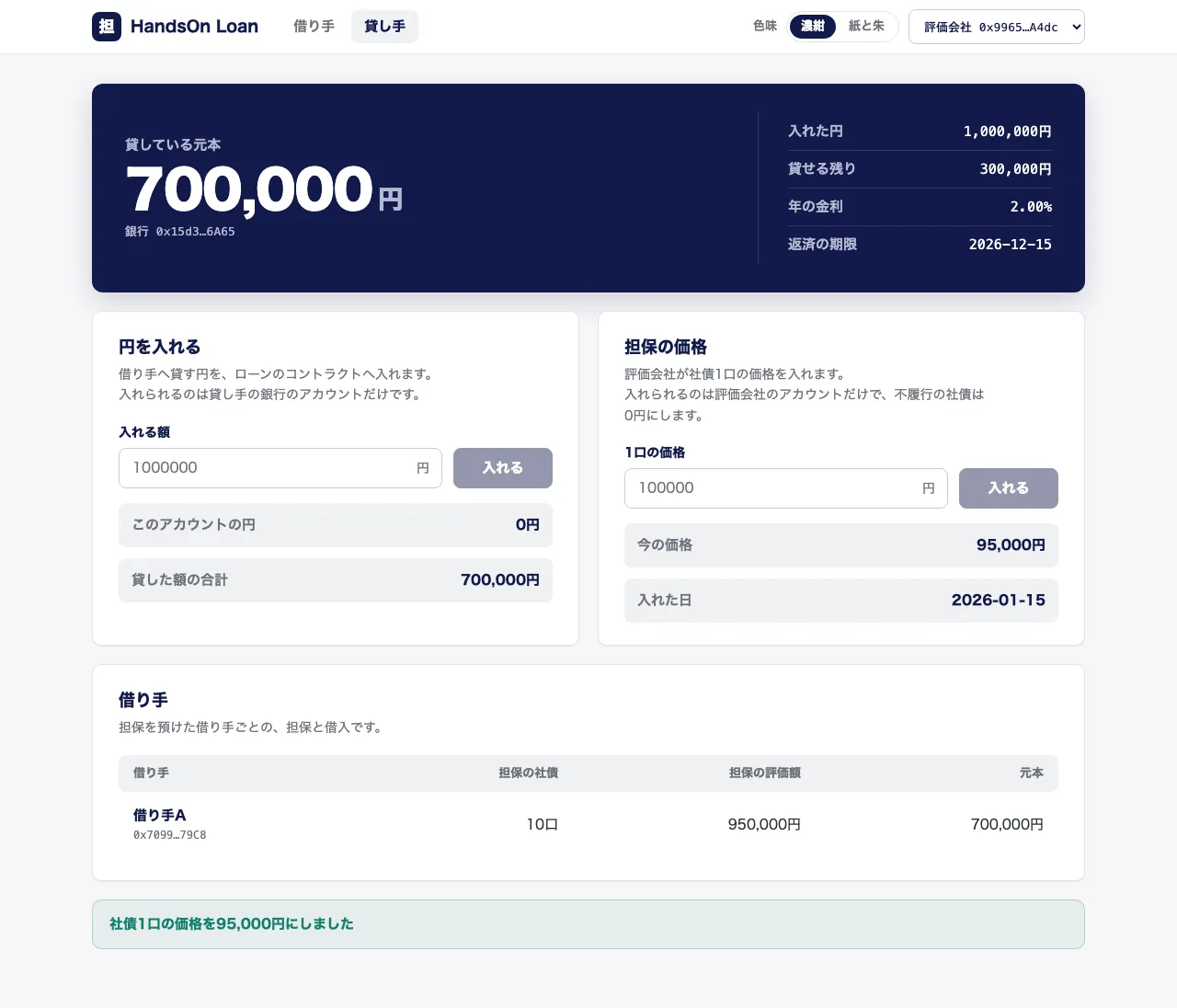
右上で「評価会社」を選び直して同じように入れると、「社債1口の価格を95,000円にしました」と出ます。
借り手の表の担保の評価額が950,000円に変わり、借り手のページの借入枠も760,000円に下がります。
これで節1は終わりです。
評価会社が入れる価格で担保を評価し、掛け目の枠まで借りるところまでを、コントラクトから画面まで作りました。
次の節では、借りた元本に日割りの利息を付けて返せるようにし、古い価格を断ります。
画面には、担保の評価額を元本と利息で割った担保維持率を出します。