利払いの画面を作る
作るもの
このレッスンを終えると、ローカルノードの時刻をヘッダーの下の帯から記録日と利払い日へ進められます。
発行体のページでは、回ごとの日数と1口の利金と払う総額を見て、足りない分の利金を入れられます。
投資家のページでは、記録日に持っていた口数と受け取れる額を見て、利払い日の後に利金を受け取れます。
背景
社債の記録日と利払い日は、払込日から半年ほど先にあります。
画面で利払いを試すために、半年待つことはできません。
前の節では、ローカルノードのanvilに次のブロックの時刻を決めさせるuse-time-travel.tsを作り、締め切りの後へ時刻を進めました。
このレッスンでは同じ仕組みを使い、記録日と利払い日と満期へ進めるボタンを、ヘッダーの下の帯にまとめます。
チェーンの時刻を進められるのはローカルノードだけなので、Fujiでは帯を出しません。
利払いの画面では、発行体と投資家で見るものが違います。
| ページ | 枠 | 見るものとできること |
|---|---|---|
発行体 (/issuer) |
利払い | 回ごとに日数と1口の利金と払う総額と入金済みの額を見て、足りない分を入れる |
投資家 (/) |
利金 | 回ごとに記録日の口数と受け取れる額を見て、利払い日の後に受け取る |
どちらの枠も、決済のコントラクトの値をそのまま出します。
発行体のページで入金済みになった回は、投資家のページでも入金済みになります。
入金が総額に届かないまま利払い日を過ぎた回は、どちらのページでも未払いと出ます。
実装
まず、時刻の帯のボタンがどこまで時刻を進めるかを決めるapp/src/lib/time.tsを作ります。
// 時刻の帯のボタンが、チェーンの時刻をどこまで進めるかを決める。
// ローカルノード (anvil) だけが時刻を進められるので、それ以外のチェーンでは何も返さない

export const LOCAL_CHAIN_ID = 31337;

export type Schedule = {
  recordDates: number[];
  paymentDates: number[];
  maturity: number;
};

export type Target = {
  label: "次の記録日へ進める" | "利払い日へ進める" | "満期へ進める";
  // 進める先のUnix時刻。もう進める先がない時は null にし、ボタンを押せなくする
  time: number | null;
};

function nextAfter(dates: number[], now: number): number | null {
  return dates.find((date) => date > now) ?? null;
}

export function timeTargets(chainId: number, now: number, schedule: Schedule): Target[] {
  if (chainId !== LOCAL_CHAIN_ID) return [];
  return [
    { label: "次の記録日へ進める", time: nextAfter(schedule.recordDates, now) },
    { label: "利払い日へ進める", time: nextAfter(schedule.paymentDates, now) },
    { label: "満期へ進める", time: schedule.maturity > now ? schedule.maturity : null },
  ];
}| コード | 意味 |
|---|---|
LOCAL_CHAIN_ID = 31337 |
anvilのチェーンID。 これ以外のチェーンでは空の配列を返し、帯を出さない |
nextAfter(dates, now) |
日付の並びから、今より後の最初の日付を探す。 記録日へ進めた後に押すと、次の回の記録日へ進む |
time: null |
全ての記録日か利払い日を過ぎた時は、進める先がないのでボタンを押せなくする |
「満期へ進める」は、節5の償還で使います。
画面に依らない計算をlib/の関数に分けておくと、ブラウザを開かずにテストで確かめられます。
次に、帯を出すapp/src/components/time-band.tsxを作ります。
"use client";

import { formatDate } from "@/lib/format";
import { timeTargets } from "@/lib/time";

import { useSession } from "./session";
import { useBond } from "./use-bond";
import { useTimeTravel } from "./use-time-travel";

// ローカルノードの時だけ、ヘッダーの下に出す時刻の帯。記録日と利払い日と満期を待たずに試せる
export function TimeBand() {
  const { chainId, contracts } = useSession();
  const bond = useBond();
  const { moving, moveTo } = useTimeTravel();

  const now = Number(bond.now ?? 0n);
  const schedule = {
    recordDates: bond.coupons.map((coupon) => Number(coupon.recordDate ?? 0n)),
    paymentDates: bond.coupons.map((coupon) => Number(coupon.paymentDate ?? 0n)),
    maturity: Number(bond.maturity ?? 0n),
  };
  const targets = contracts.bond && bond.now !== undefined ? timeTargets(chainId, now, schedule) : [];
  if (targets.length === 0) return null;

  return (
    <div className="time-band">
      <div className="time-band-inner">
        <p className="time-band-date">
          チェーンの日付 <time>{formatDate(now)}</time>
        </p>
        <div className="time-band-actions">
          {targets.map((target) => (
            <button
              key={target.label}
              type="button"
              className="button button-small"
              disabled={target.time === null || moving}
              title={target.time === null ? undefined : `${formatDate(target.time)}へ進めます`}
              onClick={() => target.time !== null && moveTo(target.time)}
            >
              {target.label}
            </button>
          ))}
        </div>
      </div>
    </div>
  );
}| コード | 意味 |
|---|---|
bond.now |
最新のブロックの時刻。 画面の時計ではなく、チェーンの時刻を出す |
contracts.bond && bond.now !== undefined |
社債をまだデプロイしていない時と、時刻を読めていない時は帯を出さない |
moveTo(target.time) |
前の節のuseTimeTravelで、次のブロックの時刻を決めて1ブロックを掘り、画面の読み取りを全てやり直す |
title |
ボタンにマウスを重ねると、進める先の日付が出る |
帯の見た目は、雛形のglobals.cssに.time-bandとして入っています。
app/src/app/layout.tsxで帯を読み込み、ヘッダーの下に置きます。
どのページでも帯が出るように、ページの中ではなく全体の枠に置きます。
import { Header } from "@/components/header";
import { TimeBand } from "@/components/time-band"; <Header />
<TimeBand />
<main className="main">{children}</main>続けて、利払いの値を読むapp/src/components/use-bond.tsを広げます。
回ごとの値を持つCouponの型に、日数と1口の利金と総額と入金済みの額、今のアカウントの記録日の口数と受け取ったかを足します。
export type Coupon = {
  n: number;
  recordDate: bigint | undefined;
  paymentDate: bigint | undefined;
  days: bigint | undefined;
  perUnit: bigint | undefined;
  due: bigint | undefined;
  funded: bigint | undefined;
  // 今のアカウントが記録日に持っていた口数と、受け取ったか
  unitsAtRecord: bigint | undefined;
  claimed: boolean | undefined;
};
回ごとの読み取りに、決済のコントラクトの4つの関数を足します。
記録日の口数は、記録日の時刻を読めた後で、別の読み取りにまとめて読みます。
  const perCoupon = useNamedReads(
    Object.fromEntries(
      indexes.flatMap((n) => [
        [`record:${n}`, { ...bond, functionName: "recordDate", args: [BigInt(n)] }],
        [`payment:${n}`, { ...bond, functionName: "paymentDate", args: [BigInt(n)] }],
        [`perUnit:${n}`, { ...settlement, functionName: "couponPerUnit", args: [BigInt(n)] }],
        [`due:${n}`, { ...settlement, functionName: "couponDue", args: [BigInt(n)] }],
        [`funded:${n}`, { ...settlement, functionName: "couponFunded", args: [BigInt(n)] }],
        [`claimed:${n}`, { ...settlement, functionName: "couponClaimed", args: [BigInt(n), me] }],
      ]),
    ),
    count > 0,
  );

  // 記録日の口数は、記録日を読めた後に読む
  const atRecord = useNamedReads(
    Object.fromEntries(
      indexes.map((n) => [`units:${n}`, { ...bond, functionName: "balanceAt", args: [me, (perCoupon[`record:${n}`] as bigint | undefined) ?? 0n] }]),
    ),
    count > 0 && indexes.every((n) => perCoupon[`record:${n}`] !== undefined),
);最後に、読んだ値を回ごとのCouponにまとめる所で、日数と足した値を詰めます。
  const coupons: Coupon[] = indexes.map((n) => {
    const paymentDate = perCoupon[`payment:${n}`] as bigint | undefined;
    const start = n === 0 ? (base.issueDate as bigint | undefined) : (perCoupon[`payment:${n - 1}`] as bigint | undefined);
    return {
      n,
      recordDate: perCoupon[`record:${n}`] as bigint | undefined,
      paymentDate,
      days: paymentDate !== undefined && start !== undefined ? (paymentDate - start) / 86_400n : undefined,
      perUnit: perCoupon[`perUnit:${n}`] as bigint | undefined,
      due: perCoupon[`due:${n}`] as bigint | undefined,
      funded: perCoupon[`funded:${n}`] as bigint | undefined,
      unitsAtRecord: atRecord[`units:${n}`] as bigint | undefined,
      claimed: perCoupon[`claimed:${n}`] as boolean | undefined,
    };
});| コード | 意味 |
|---|---|
couponClaimedのargs: [BigInt(n), me] |
今のアカウントがその回を受け取ったかを読む。 右上でアカウントを切り替えると読み直す |
atRecord |
balanceAtに記録日の時刻を渡し、今のアカウントの記録日の口数を読む |
indexes.every(...) |
全ての回の記録日を読めるまで、atRecordを読まない。記録日の代わりに0を渡して読むのを避ける |
(paymentDate - start) / 86_400n |
コントラクトのcouponPerUnitと同じく、前の利払い日 (第1回は払込日) からの日数を出す |
コントラクトが拒んだ理由の文を、app/src/lib/format.tsに6つ足します。
const reasons: Record<string, string> = {
  ERC20InsufficientBalance: "円トークンか社債の残高が足りません",
  ERC20InsufficientAllowance: "決済のコントラクトに任せた額が足りません",
  AccessControlUnauthorizedAccount: "このアカウントは、この操作をする役割を持っていません",
  NotAllowed: "円トークンの名簿で本人確認が済んでいないアカウントです",
  AccountFrozen: "円トークンの名簿で凍結されたアカウントです",
  OverIssueAmount: "発行額に達したので、これ以上は申し込めません",
  AfterDeadline: "申込の締め切りを過ぎています",
  BeforeDeadline: "締め切りの後に押せます",
  AlreadyClosed: "募集はもう締めました",
  OnlyIssuer: "発行体のアカウントだけが入れられます",
  NotIssued: "社債をまだ発行していません",
  BeforePaymentDate: "利払い日の後に受け取れます",
  CouponUnfunded: "発行体の入金が足りないため、この回は未払いです",
  AlreadyClaimed: "この回の利金はもう受け取りました",
  NothingToClaim: "記録日に社債を持っていなかったので、この回の利金はありません",
};発行体のページのapp/src/components/issuer-view.tsxには、募集の枠の下に利払いの枠を足します。
円トークンのjpyとformatYenとlinesは前の節から読み込んであるので、読み込みの行は変えずに済みます。
        </Card>
      </div>

      <Card title="利払い" description="1口の利金は、額面 × 利率 × 日数 / 365 を1円未満で切り捨てた額です。払う総額は、記録日の口数に1口の利金を掛けた額です。">
        <div className="table-wrap">
          <table className="table">
            <thead>
              <tr>
                <th>回</th>
                <th>記録日</th>
                <th>利払い日</th>
                <th>日数</th>
                <th className="num">1口の利金</th>
                <th className="num">払う総額</th>
                <th className="num">入金済み</th>
                <th>状態</th>
                <th aria-label="操作" />
              </tr>
            </thead>
            <tbody>
              {bond.coupons.map((coupon) => {
                const gap = (coupon.due ?? 0n) - (coupon.funded ?? 0n);
                const late = coupon.paymentDate !== undefined && now >= coupon.paymentDate;
                return (
                  <tr key={coupon.n}>
                    <td>第{coupon.n + 1}回</td>
                    <td>{formatDate(coupon.recordDate)}</td>
                    <td>{formatDate(coupon.paymentDate)}</td>
                    <td>{coupon.days === undefined ? "-" : `${coupon.days}日 / 365日`}</td>
                    <td className="num">{formatWholeYen(coupon.perUnit)}</td>
                    <td className="num">{formatYen(coupon.due)}</td>
                    <td className="num">{formatYen(coupon.funded)}</td>
                    <td>
                      {coupon.due !== undefined && coupon.due > 0n && gap <= 0n ? (
                        <Badge tone="good">入金済み</Badge>
                      ) : late ? (
                        <Badge tone="bad">未払い</Badge>
                      ) : (
                        <Badge tone="plain">未入金</Badge>
                      )}
                    </td>
                    <td className="num">
                      <button
                        type="button"
                        className="button button-small"
                        disabled={!bond.issued || gap <= 0n || pending !== undefined}
                        onClick={() =>
                          send(`coupon-${coupon.n}`, `第${coupon.n + 1}回の利金${formatYen(gap)}を入れました`, [
                            { ...jpy, functionName: "approve", args: [contracts.settlement, gap] },
                            { ...settlement, functionName: "fundCoupon", args: [BigInt(coupon.n), gap] },
                          ])
                        }
                      >
                        {pending === `coupon-${coupon.n}` ? "入れています" : "利金を入れる"}
                      </button>
                    </td>
                  </tr>
                );
              })}
            </tbody>
          </table>
        </div>
        <p className="card-foot">{lines("入れた額が総額より多い時は、差を発行体へ返します。足りない回は、利払い日の後も足りない分を入れられます。")}</p>
      </Card>

<NoticeLine notice={notice} />| コード | 意味 |
|---|---|
gap |
総額からすでに入れた額を引いた、足りない分。 ボタンはこの額だけを入れる |
late |
利払い日を過ぎたか。 過ぎても総額に届いていない回は、赤い「未払い」の札にする |
`${coupon.days}日 / 365日` |
日割りの分数をそのまま見せ、1口の利金がどう決まったかを読めるようにする |
approveとfundCouponの2つの取引 |
円トークンで足りない分を決済のコントラクトに任せてから、利金を入れる |
disabledの!bond.issuedとgap <= 0n |
社債を発行する前と、総額に届いた後は押せない |
投資家のページのapp/src/components/investor-view.tsxには、申し込む枠の下に利金の枠を足します。
        </Card>
      </div>

      <Card title="利金" description="記録日に持っていた口数で、受け取れる額が決まります。記録日の後に売っても、その回の利金は受け取れます。">
        <div className="table-wrap">
          <table className="table">
            <thead>
              <tr>
                <th>回</th>
                <th>記録日</th>
                <th>利払い日</th>
                <th className="num">記録日の口数</th>
                <th className="num">受け取れる額</th>
                <th>状態</th>
                <th aria-label="操作" />
              </tr>
            </thead>
            <tbody>
              {bond.coupons.map((coupon) => {
                const recorded = coupon.recordDate !== undefined && now >= coupon.recordDate;
                const paid = coupon.paymentDate !== undefined && now >= coupon.paymentDate;
                const funded = coupon.due !== undefined && coupon.due > 0n && (coupon.funded ?? 0n) >= coupon.due;
                const units = recorded ? coupon.unitsAtRecord : undefined;
                const amount = units !== undefined && coupon.perUnit !== undefined ? units * coupon.perUnit : undefined;
                return (
                  <tr key={coupon.n}>
                    <td>第{coupon.n + 1}回</td>
                    <td>{formatDate(coupon.recordDate)}</td>
                    <td>{formatDate(coupon.paymentDate)}</td>
                    <td className="num">{units === undefined ? "-" : formatUnitsCount(units)}</td>
                    <td className="num">{amount === undefined ? "-" : formatWholeYen(amount)}</td>
                    <td>
                      {coupon.claimed ? (
                        <Badge tone="info">受け取り済み</Badge>
                      ) : !paid ? (
                        <Badge tone="plain">利払い日の前</Badge>
                      ) : funded ? (
                        <Badge tone="good">入金済み</Badge>
                      ) : (
                        <Badge tone="bad">未払い</Badge>
                      )}
                    </td>
                    <td className="num">
                      {paid && !coupon.claimed && (units ?? 0n) > 0n ? (
                        <button
                          type="button"
                          className="button button-small"
                          disabled={!funded || pending !== undefined}
                          onClick={() =>
                            send(`claim-${coupon.n}`, `第${coupon.n + 1}回の利金を受け取りました`, [
                              { ...settlement, functionName: "claimCoupon", args: [BigInt(coupon.n)] },
                            ])
                          }
                        >
                          {pending === `claim-${coupon.n}` ? "受け取っています" : "受け取る"}
                        </button>
                      ) : null}
                    </td>
                  </tr>
                );
              })}
            </tbody>
          </table>
        </div>
      </Card>

<NoticeLine notice={notice} />| コード | 意味 |
|---|---|
recorded ? coupon.unitsAtRecord : undefined |
記録日の前は口数を「-」にする。balanceAtはまだ来ていない時刻に今の口数を返すため、記録日までに売り買いすると変わる数を見せないようにする |
units * coupon.perUnit |
受け取れる額は、コントラクトのclaimCouponと同じく1口の利金に記録日の口数を掛けた額 |
paid && !coupon.claimed && (units ?? 0n) > 0n |
利払い日の後で、まだ受け取っておらず、記録日に1口以上を持っていた回にだけボタンを出す |
disabledの!funded |
入金が総額に届いていない回は、ボタンを出しても押せない。 札は赤い「未払い」になる |
確かめる
starter/appのディレクトリでpnpm devを止めてから実行し直し、ブラウザでポート3402の画面を開きます。
pnpm devはanvilを2026-01-01の空のチェーンから立ち上げ直すため、申込から始めます。
ヘッダーの下に、チェーンの日付と3つのボタンの帯が出ます。
投資家のページで右上のアカウントを投資家Aに切り替え、申し込む枠で10口を申し込みます。
同じように、投資家Bが12口を、投資家Cが8口を申し込みます。
発行体のページへ移り、募集の枠の「締め切りの後へ進める」と「募集を締める」を押して30口を発行します。
帯の「次の記録日へ進める」を押すと、チェーンの日付が2026-07-10になります。
利払いの枠の第1回の行には、181日と396円と11,880円が出ています。
第1回の行の「利金を入れる」を押すと、「第1回の利金11,880円を入れました」と出て、札が「入金済み」に変わります。
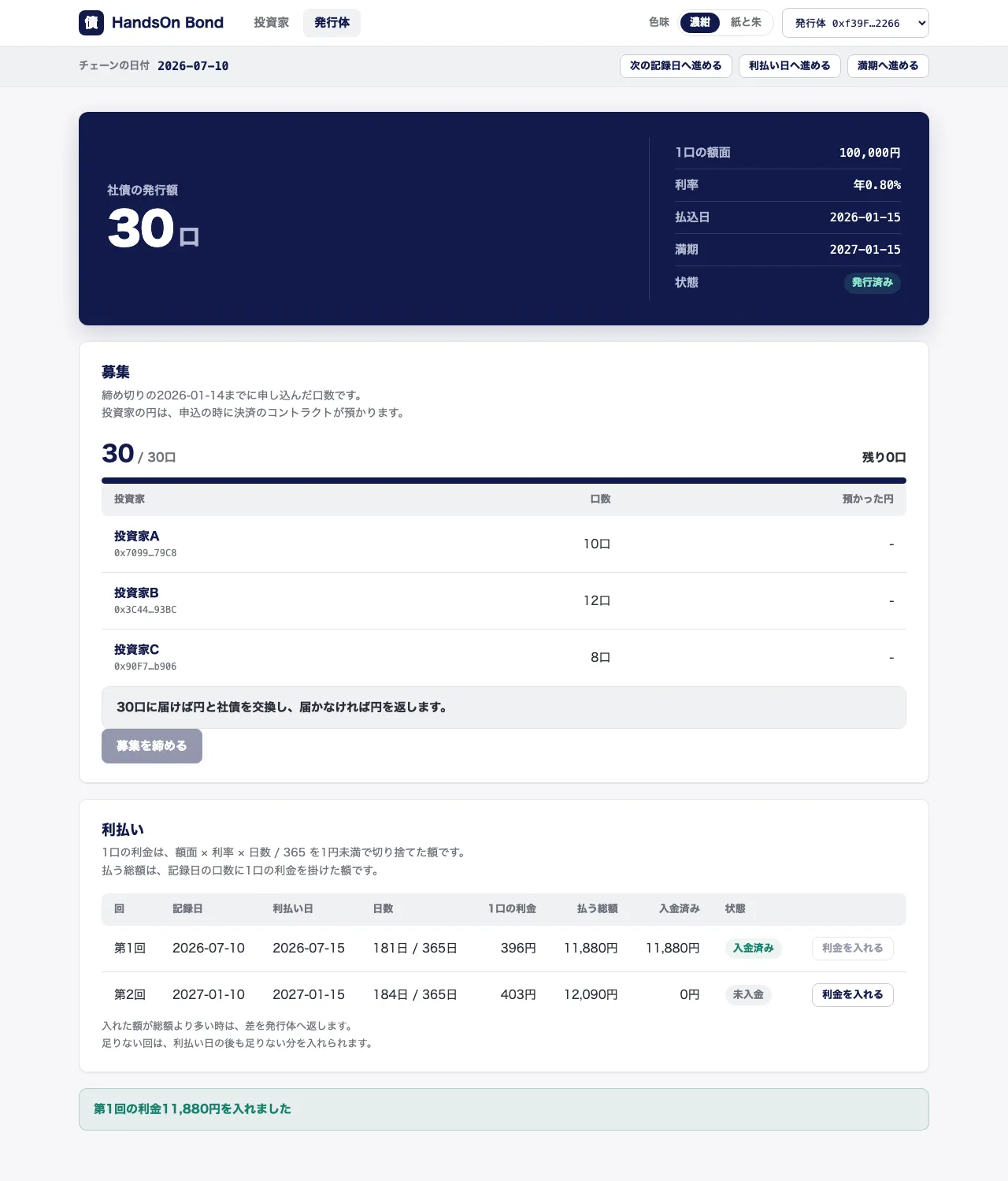
続けて帯の「利払い日へ進める」を押し、チェーンの日付を2026-07-15にします。
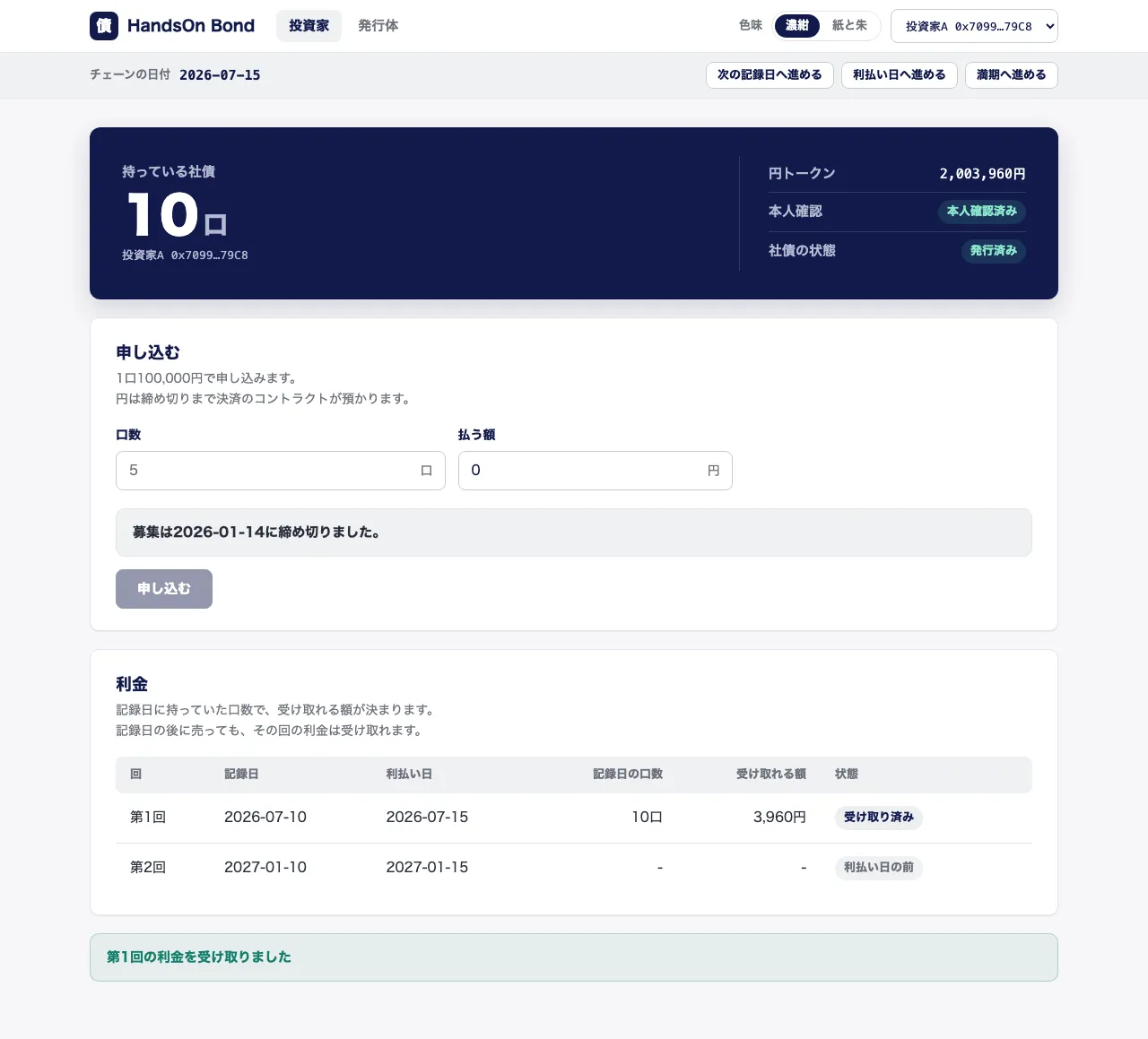
投資家のページへ移って右上で投資家Aに切り替えると、利金の枠の第1回の行に、記録日の口数の10口と受け取れる額の3,960円が出ます。
「受け取る」を押すと「第1回の利金を受け取りました」と出て、札が「受け取り済み」に変わります。
円トークンの残高は3,960円増えます。
利金を入れる前に「利払い日へ進める」を押すと、発行体の札は「未払い」になり、投資家の「受け取る」は押せません。
そこから発行体が「利金を入れる」を押すと、投資家は遅れて受け取れるようになります。
帯の時刻は進めることしかできないので、初めから試し直す時はpnpm devを止めてから実行し直します。
ここで節3が終わり、記録日の口数で日割りの利金を払うところまでを、ブラウザから試せます。